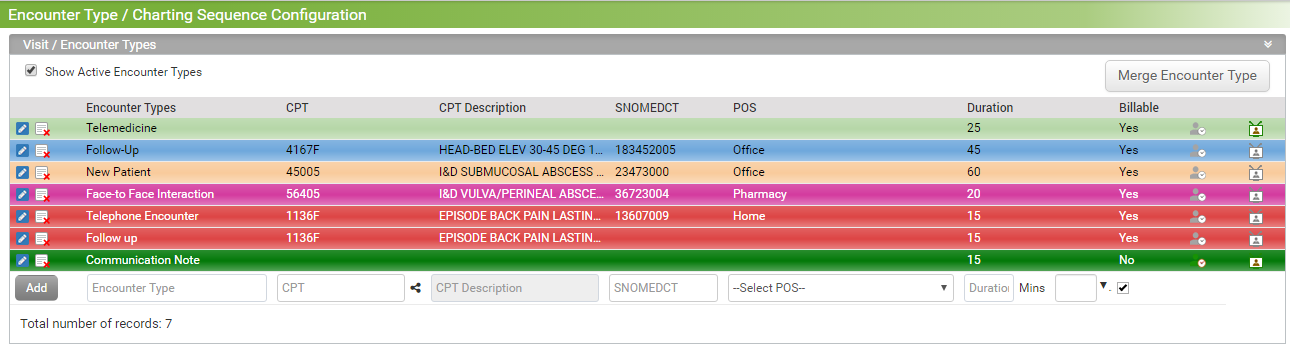
Configuring Encounter Type/ Visit Type is now more easier!
To configure the Encounter type, do the following:
| 1. | From the left panel, go to Administration > General > Encounter Type/Charting Sequence. |
| 2. | To view the active encounter types select the "Show Active Encounter Types". |
| 3. | You can drag and drop the visit/encounter types up and down. |
| 4. | To configure re-evaluation feature for encounter type, click this  icon. icon. |
| 5. | To configure telemedicine visit for the the encounter type, click this  icon. icon. |
| 6. | To edit encounter type, click this  icon. icon. |
| 7. | To inactivate visit/encounter type click this  icon. icon. |
| 8. | To Add new encounter type: |
| • | Enter the Encounter Type. |
| • | Enter CPT/SNOMEDCT code. |
| • | Click the map icon  next to CPT to configure Modifiers and Units. next to CPT to configure Modifiers and Units. |
| • | Select the Place of Service from the drop down list. |
| • | Enter Duration in minutes. |
| • | Select any color for encounter from the color palette. |
| • | After entering all details, click Add. The newly created encounter type will then appear in Encounter Types grid. |